
Nano Banana Product Backgrounds: A Two-Product Test
MidassAI Team · October 15, 2026 · 7 min read
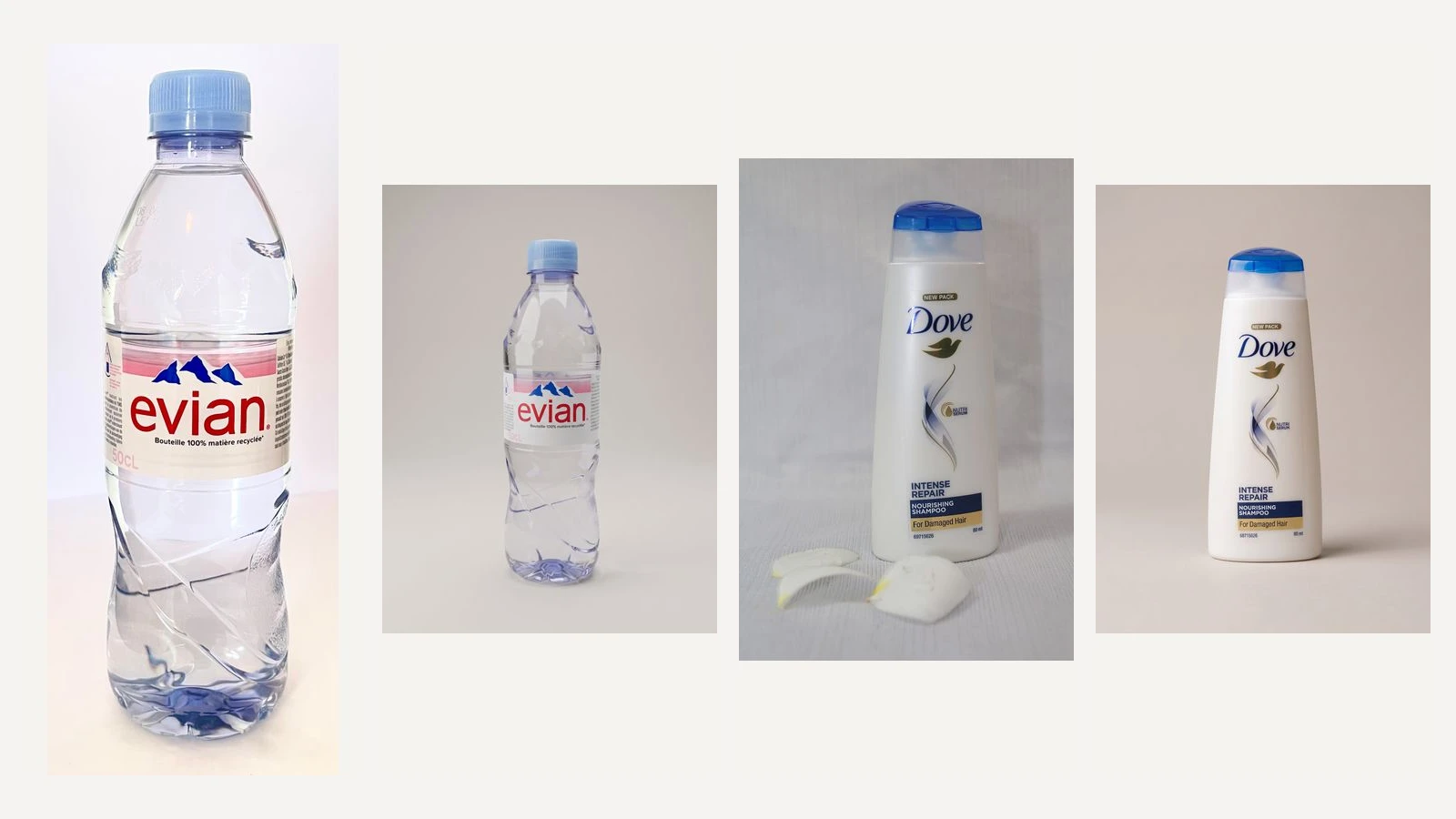
A product background edit is useful when the buyer still recognizes the same item after the scene changes. For a marketing image, that means checking the brand, bottle shape, material and framing together. A cleaner backdrop alone is not enough, and asking the model to preserve everything does not make the result pixel-identical.
This case follows a clear plastic Evian bottle and a separate Dove shampoo bottle through the same Nano Banana background-editing method. We requested a warm-gray studio surface, a 3:4 portrait frame and 2K output. The images below show actual inputs and generated results, with a checklist you can reuse before placing an image in a campaign.
Choose a photo that already shows the product
Start with one complete item, a visible cap or closure, and enough detail to recognize its main name. Use a photograph you are entitled to edit. A flat packaging label is a different task: it does not show the finished object's depth, edge or shape, so it is a poor substitute for a product photograph.
Our development image shows an Evian bottle with a blue cap, a pink label band and clear plastic. The second input shows a white Dove bottle with a blue cap against fabric, with petals in the foreground. We checked that the entire bottle was visible before running it. We did not use a generated Dove result to adjust the prompt.
Decide where the image will go before generating. A promotional layout may need clean negative space; a detail page may need a faithful close-up. Shopify's ecommerce photography guide distinguishes clean product views, lifestyle scenes and detail photographs. These are useful planning categories, not evidence that an AI edit improves sales. Here we test only a simple studio background.
Keep the request narrow
The instruction names one change: replace the background. It also names the features that should remain recognizable and asks for no extra props. We kept this English instruction unchanged for both products. The wording is a request to the model; the visual checks below decide whether its output is usable.
Edit only the background of this product photograph. Place the same product on a light warm-gray studio surface with a seamless matching backdrop and a soft natural contact shadow. Preserve the exact product silhouette, cap or tube components, product color and material. Preserve all visible prominent label lettering, logos, symbols, artwork and their layout without translating, correcting or inventing details. Keep the original camera angle. Show the whole product centered in a 3:4 portrait frame with space around it. Match the new scene to the existing product lighting. Add no props, extra products, captions or graphics. Do not redraw or beautify the product itself.In an image editor that accepts a reference photograph, attach the original, choose the image-editing mode, and request 3:4 and 2K if those controls are available. Generate one result and save its original download before making any adjustments. Do not start by changing the camera angle, adding props and redesigning the label together: that makes it harder to identify why a result drifted.
Google identifies Nano Banana 2 as Gemini 3.1 Flash Image in its official announcement, checked on October 15, 2026. Our recorded request used gemini-3.1-flash-image; the response did not disclose a separate model version. These samples came from image-editing API requests. They do not verify a particular website's buttons, subscription access or current model menu.
Read the development result at two scales
The Evian output puts the whole bottle on a neutral surface with a small contact shadow and comfortable space above its cap. The red brand name, blue mountain motif and pink band remain recognizable. The main French material wording is visually retained, and the pale 50cL mark is still present.
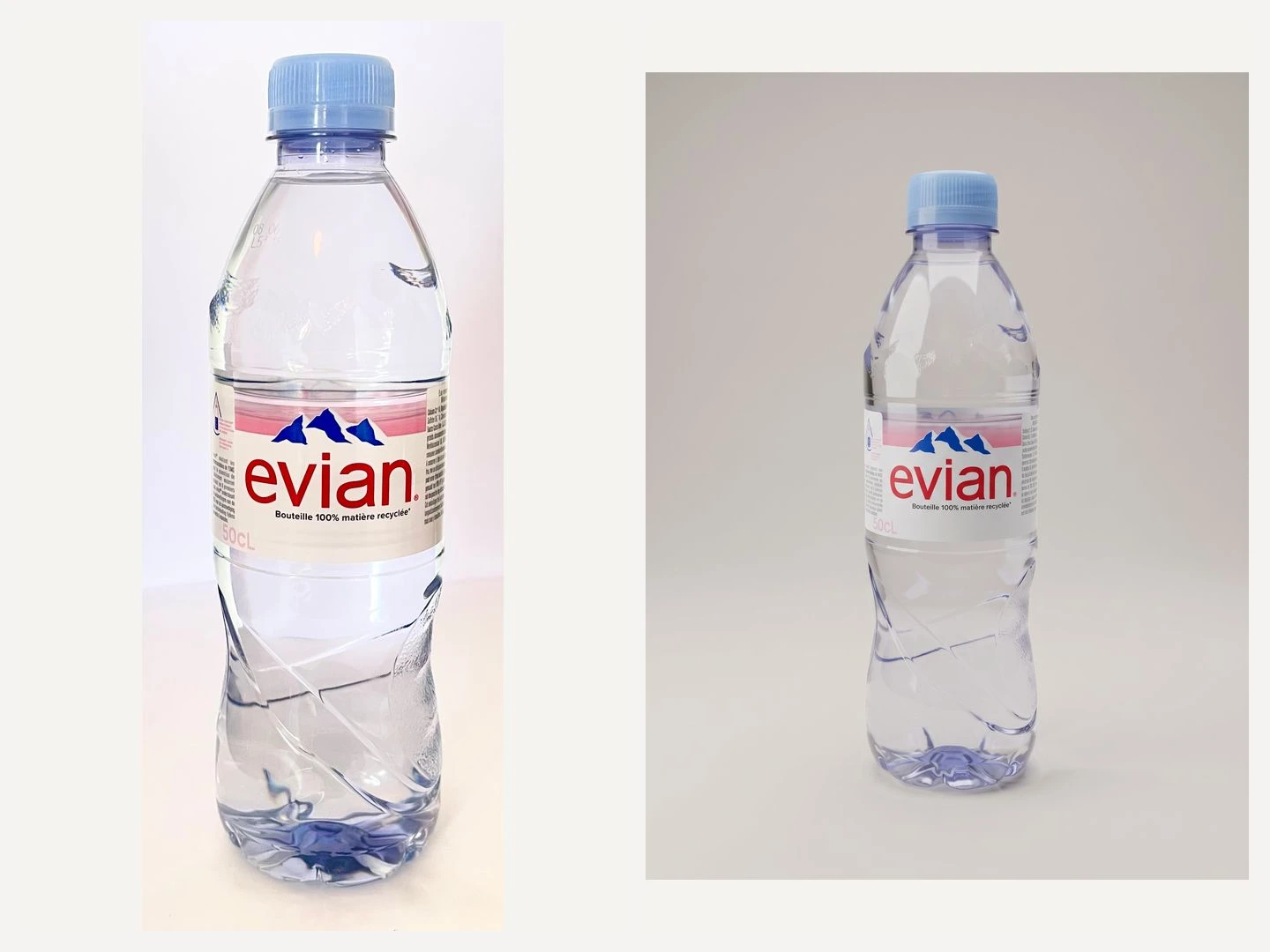
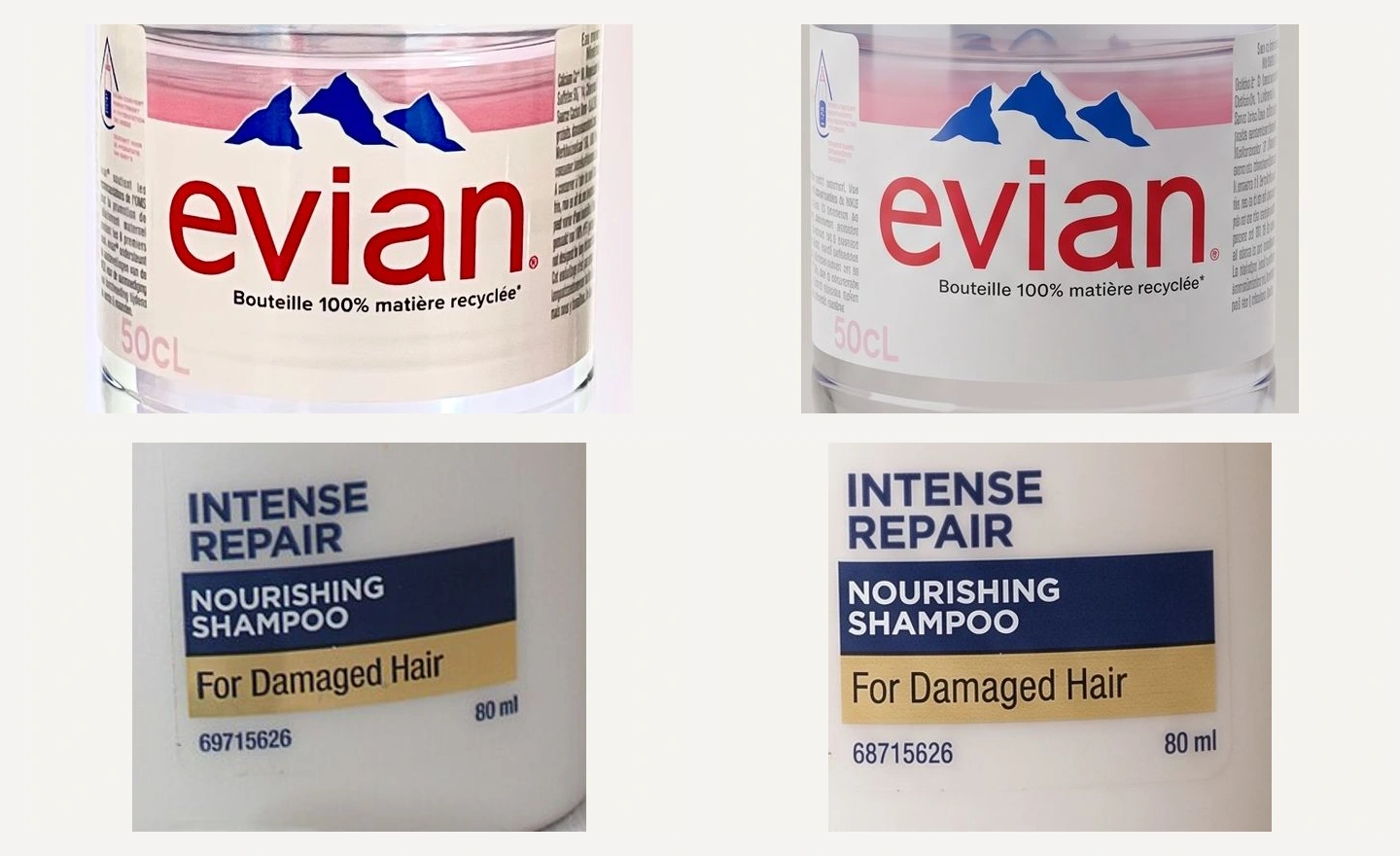
At normal display size, this works as a restrained product marketing composition. At closer inspection, the bottle ridges, reflections and edges are reconstructed. The faint production code near the shoulder is not certified by this test. A convincing overall appearance should not be turned into a claim that every printed detail survived unchanged.
Keep the original photo beside the download while reviewing. If you compare only against your memory of the brand, a plausible but incorrect label can be easy to miss. Inspect both the whole image and the region that carries the product's distinguishing information.
Check a different product before reusing the method
The Dove result removes the fabric and foreground petals while keeping a complete white bottle and blue cap. The Dove name, gold bird, Intense Repair wording and dark-blue information panel remain recognizable. The output is 1792 × 2400, as is the Evian result. Both passed the four marketing-use checks defined before generation.
There is a concrete limitation: the small number at the bottom changes from 69715626 in the photograph to 68715626 in the output. This does not prevent recognizing the shampoo for the stated marketing task, but it makes the image unsuitable as evidence of that exact code. The logo highlight and letter shapes are also regenerated.
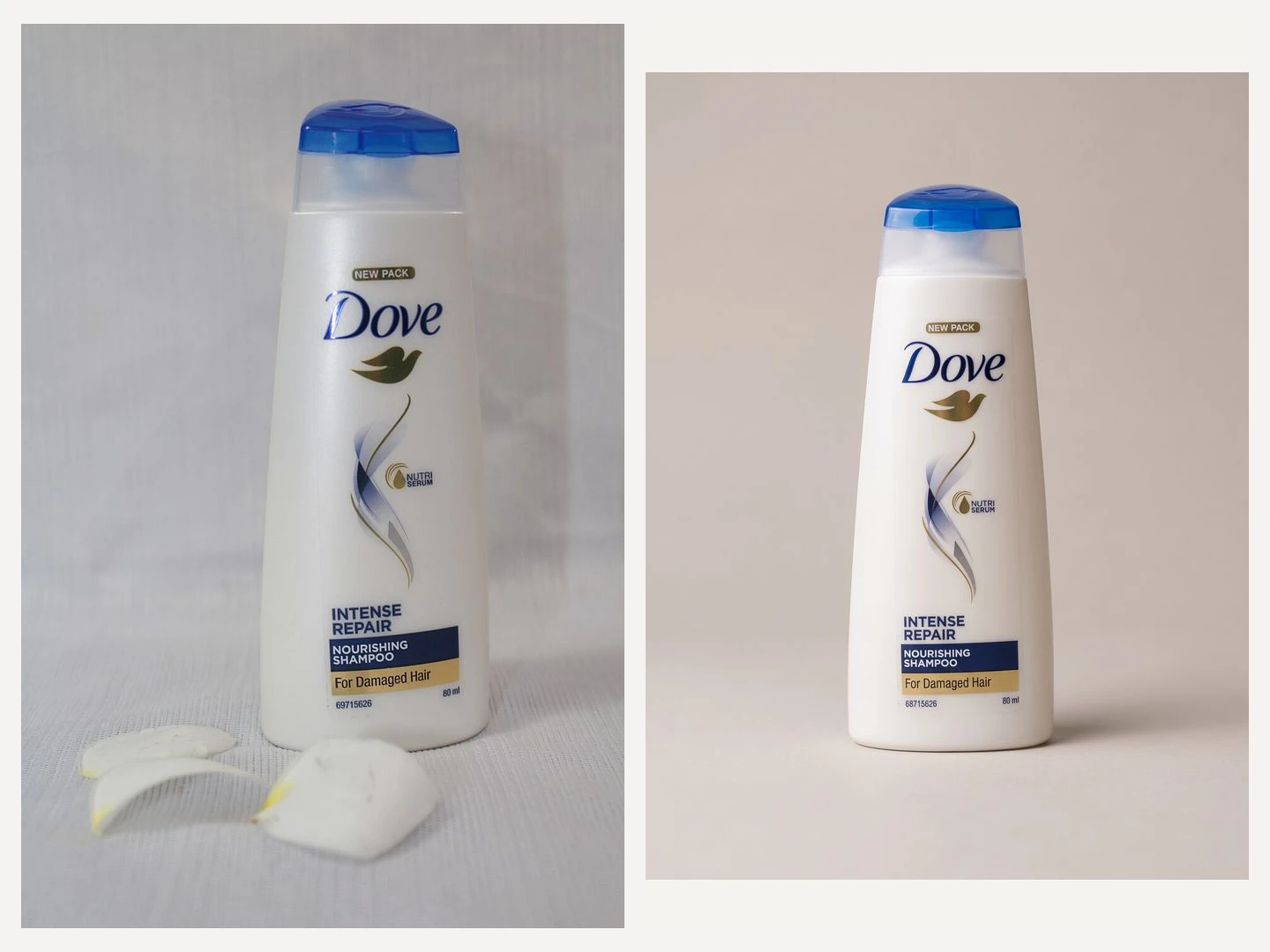
The independent check matters because a prompt that suits transparent water packaging may behave differently on an opaque bottle with a reflective logo. The same prompt and settings were used without a product-specific rewrite. This is still a small case study, not a measured success rate for a catalog of products.
The final experiment used two generation calls, one per product, without retries. Earlier work remains separate: four older sauce-bottle outputs were reviewed for marketing use, and an earlier Evian development image was accepted. A planned packaging-label test never reached the generator because the local daily limit had been reached; its input was also unsuitable. Those records are not additional independent successes for this two-product method.
Use four checks before placing the image
Identity: compare the brand name, product name and prominent claims. A changed variant or invented benefit is a reason to reject the result even if the background looks attractive. Do not judge lettering only by whether it resembles text.
Shape: look at the closure, shoulder, sides and base. Check that the complete item remains in frame and that the new silhouette still matches the kind of product being sold. A different cap or a shortened bottle can matter more than a tiny texture change.
Appearance: compare color, transparency, finish and material. Lighting may change, but white plastic should not become metal and clear packaging should not turn opaque. Reflections on transparent items need particular attention because the new scene can change how their edges read.
Composition: check the contact shadow, surrounding space and intended crop. A portrait image with generous margins can suit a promotional panel, but it has not automatically been tested as a square marketplace image or a wide banner. Preview the actual placement before exporting a new crop.
When a different method is needed
If a listing depends on exact serial numbers, certification marks, barcodes or small mandatory wording, inspect those fields separately against the real item. This study does not certify them. Where the original product pixels must remain intact, consider preserving the photographed foreground and composing it over a separate background. That is a different editing method, and we have not tested it in this case.
The linked product-background template contains the same executed prompt with editable background and framing fields. Its default values reproduce the tested instruction. Changing those fields creates a new request; the shown results do not validate every possible combination. Keep a copy of your original photograph, make one purposeful edit, and review the result at the size where your customer will see it.
Source photographs: Evian by James Tamim, CC BY-SA 4.0; Dove by Ranjima np, CC0. Evian adaptations are shared under CC BY-SA 4.0. These brands are test subjects, not endorsements.

